 Discovery Hub
Legal hold, collection and disposition
From legal hold to defensible disposition, in one place.
Give legal, eDiscovery and IT a shared record of legal holds, custodians and collection requests. Track acknowledgements, source coverage and disposition decisions in a web application deployed in your environment.
Illustration with sample data
Inside the application
A clear view of priorities and progress
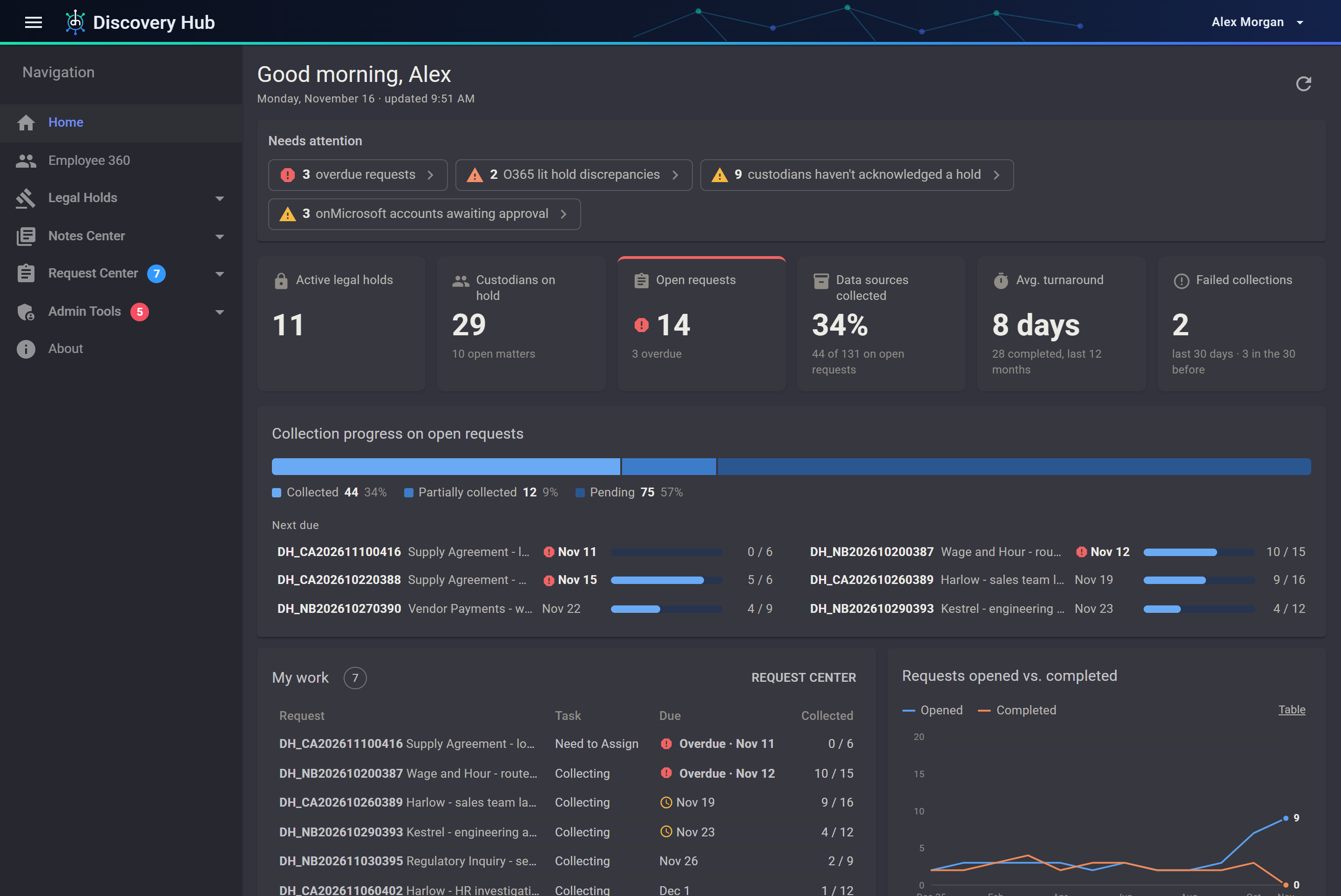
Review overdue work, custodian follow-up and collection progress from a dashboard scoped to the signed-in user. Select the image to view it full size.
 (opens the full-size image)
Know what you have
Find prior collections by custodian and matter
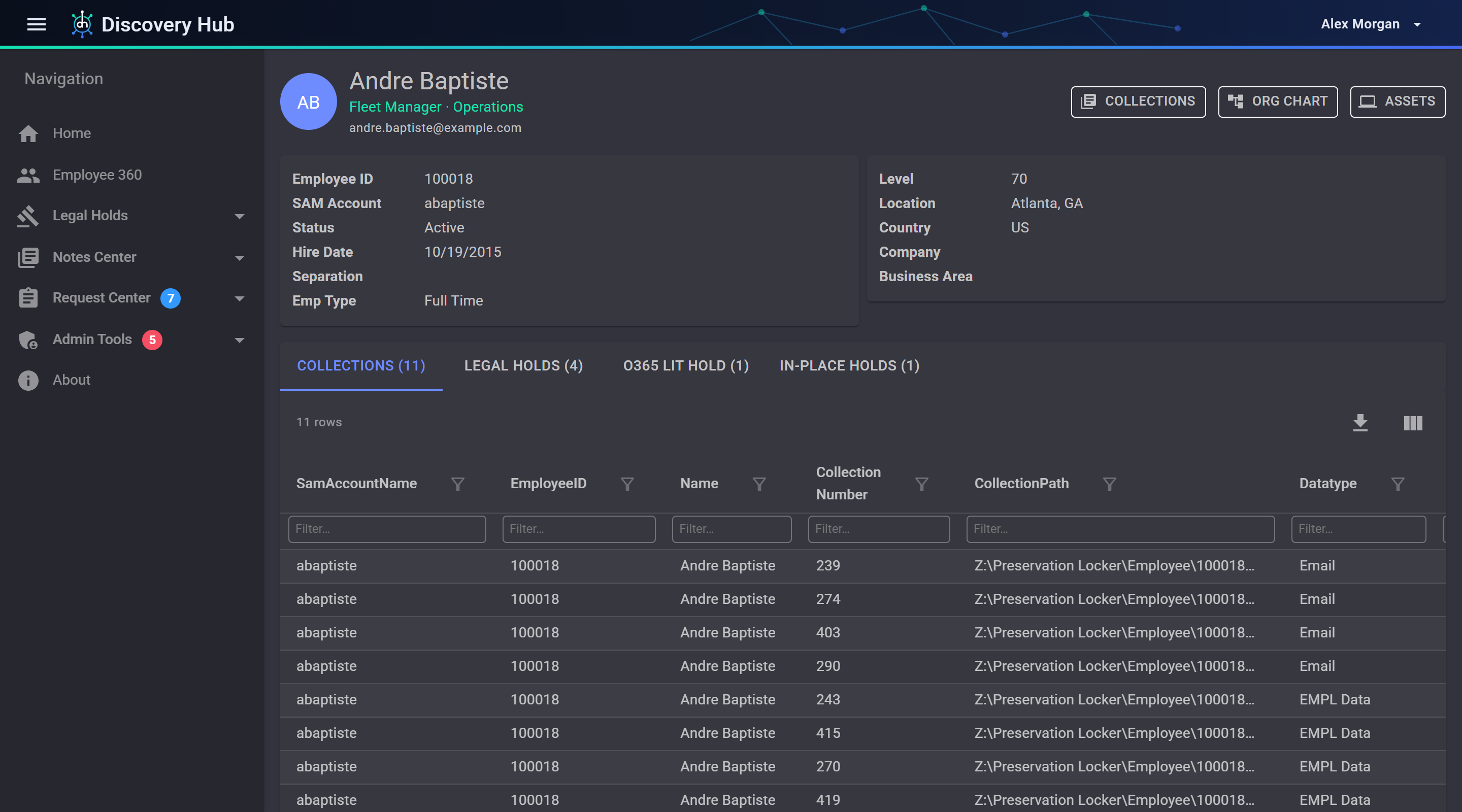
Use recorded collection history to identify existing data, understand its scope and assess whether it can support a new request.
Every custodian, across every matter
Open a person and see every collection made from them: the matter and hold it was for, the data type and date range, where it is stored, where it was produced, and whether it has been disposed of. Reuse what was already collected instead of collecting it again.
Every non-custodial source, per matter
Shared drives, databases, team sites and other sources with no single owner are recorded against each matter too, so all the ESI collected for a matter is in one place.
 (opens the full-size image)
Who it is for
One shared record for everyone on the request
Legal and e-discovery teams
Issue holds, track acknowledgements and define collection requirements. Monitor progress and outstanding work from the same matter record.
IT and forensic collectors
Get a clear list of what to collect and by when. Record each collection, flag the ones that failed, and note where the data was stored and produced.
Program owners and administrators
Watch workload, overdue requests and turnaround on the dashboard, decide exactly what each person can see and do, and review who changed what.
How it works
From the hold notice to the closed matter
Preserve
Issue the legal hold. Custodians acknowledge it in the Custodian Portal, and reminders and escalations go out on schedule.
Request
Start a collection request from the hold. Add custodians, data types, date ranges, keywords and a due date, and it goes to its collectors.
Collect and produce
Collectors record each data source as it is collected and where it was delivered. Progress and problems show up straight away.
Review and dispose
Assess eligible collections against active holds, apply your configured approval process and retain a certificate of each disposition run.
What is inside
One system for the whole matter
Legal holds
Notices from templates, a portal where custodians acknowledge them, automatic follow-up, questionnaires and a Matter Center.
Request Center
Create, assign and track collection requests for employees and for data that has no single owner.
Collections and chain of custody
Every collection by employee, group or data source, with a chain of custody report and optional file hashing.
Defensible disposition
Configured approval workflows, checks for active holds and certificates documenting disposition results.
Employee 360
One page per person: role, manager, mailbox and file storage, devices, holds and past collections.
Connectors and preservation
Connect source reporting, supported native holds and device-group workflows. Review the capabilities available for each system.
AI conversation review
Collect available Claude and ChatGPT Enterprise records through their compliance APIs, then search, tag and export retained evidence.
Scheduled reports
Reports emailed overnight as Excel or CSV, chain of custody records, disposition certificates and access reviews.
Security and audit
Detailed permissions, single sign-on, an audit history of changes, and feeds for your SIEM and other systems.
Why teams choose it
Built around legal hold and collection workflows
Connect the people, requests and records involved in discovery so teams can coordinate the work and review its history.
Legal and IT in the same system
Collection requirements and collector updates share one record, reducing duplicate entry and keeping legal and IT aligned.
Sign in with existing accounts
People use the work accounts they already have, through Windows sign-in or single sign-on, and see only what their permissions allow.
Employee data connected to the workflow
An included HR data feed keeps employee records current. Look up individual custodians or search a pasted list of employee identifiers.
Security and control
Your data stays in your environment
Keep the application database and collected evidence in infrastructure managed by your organization, with your own identity and network controls.
Runs on your servers
The website, the database and the collected data sit on your Windows servers and SQL Server, behind your own sign-in and network controls.
Traceable activity
Audit history shows who changed which user, permission, setting, matter or hold. Access reviews list every user and where each permission comes from.
Documented disposition decisions
Collection disposition checks for active holds and follows the approval requirements you configure. AI archives use separate retention rules with legal-hold protection.
Connects to what you run
A security event log for your SIEM, signed webhooks and a REST API with keys you control, all off until you turn them on.
See how Discovery Hub fits your workflow
Explore the workflows, integrations and deployment requirements relevant to your team in a guided product demonstration.